As a business consulting partner, after working with organizations across different industries, we’ve noticed that most operational challenges aren’t really caused by technology. Actually, they’re caused by the processes surrounding it.
For instance, an approval gets stuck because someone is out of the office or a service request sits in a queue waiting for the right person to see it. In some cases, employees jump between Teams, email, SharePoint, spreadsheets, and business applications just to find a piece of information they need to do their job.
None of these issues are new to organizations, but they become harder to manage as the businesses grow.
Organizations have invested in workflow automation for years, yet many everyday processes still rely on manual work. However, the challenge is that many processes still depend on people manually moving information from one place to another, answering the same questions repeatedly, or deciding what should happen next.
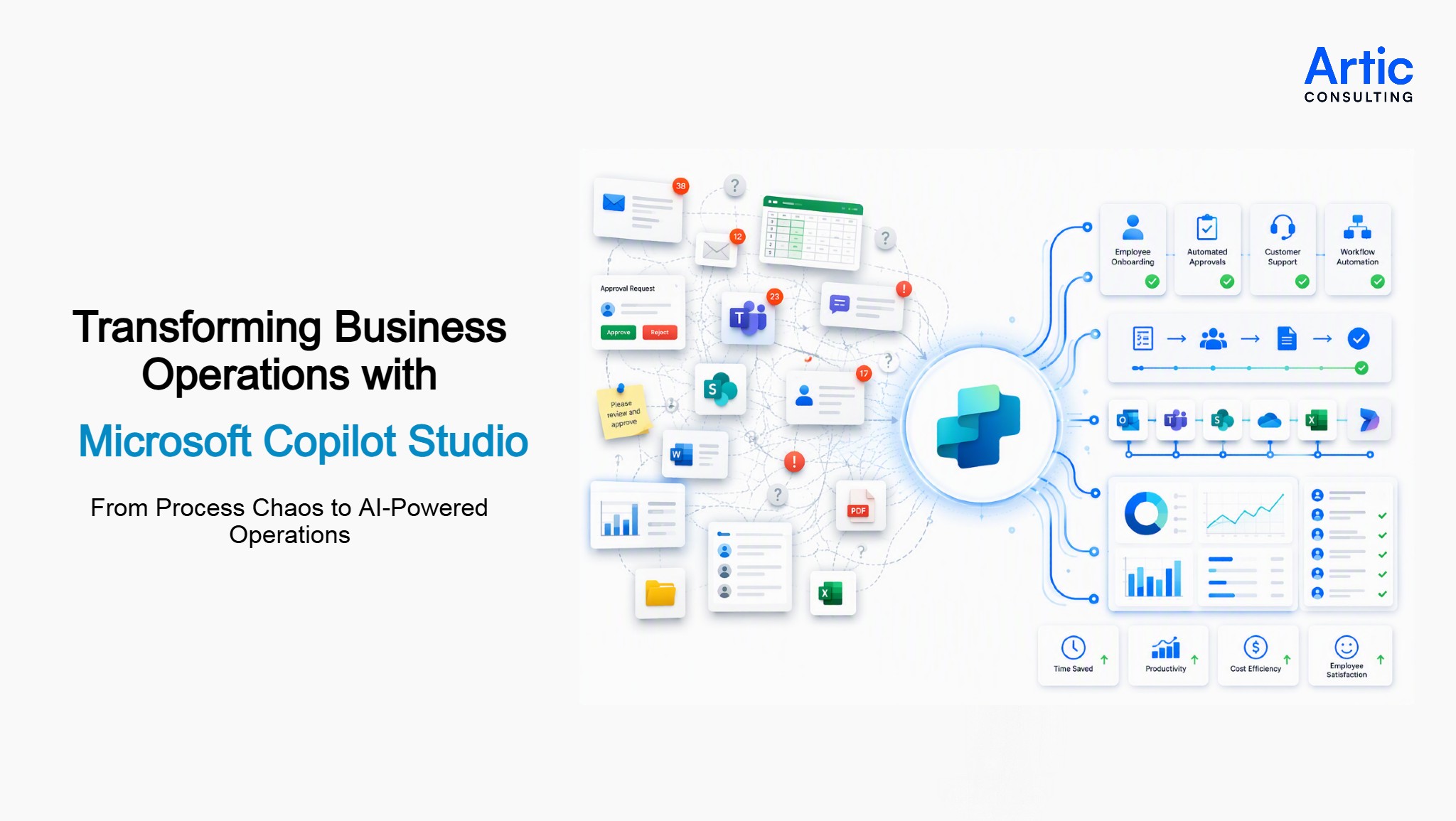
That’s one reason Microsoft Copilot Studio is getting so much attention. Instead of building another chatbot that only answers questions, enterprises can now create AI agents that help move work forward. An employee might ask about the status of a procurement request, start an onboarding process, or submit an IT request through a single conversation. Behind the scenes, the AI agent can connect with business systems and workflows to keep work moving.
Enterprises are getting more than just faster responses. It’s a completely different way of handling business operations. Tasks that once required multiple emails, forms, or handoffs can happen through a single interaction.
For organizations exploring AI-powered business operations, Microsoft Copilot Studio provides a practical way to combine business process automation, workflow automation, and intelligent assistance without forcing employees to learn yet another tool.
Let’s take a look at how Microsoft Copilot Studio is helping those organizations simplify processes, reduce manual effort, and create more efficient operations across the business.
Why Business Processes Become More Difficult to Manage as Organizations Grow
A lot of processes work just fine until the company gets bigger.
Let me explain how. A manager approves a request in a few minutes, someone from IT helps with a software installation, or HR answers a policy question.
Nobody thinks much about it. But then slowly the business grows.
Suddenly there are more requests, more employees, more systems, and more people involved in every decision. What once felt simple starts taking longer. A request sits in someone’s inbox. An approval is waiting on a person who is on vacation. A team spends half a day figuring out who owns the next step.
The technology may be working exactly as intended. The process around it often isn’t.
Everyday Processes That Slow Teams Down
If you look at most organizations, the biggest frustrations rarely come from major projects.
They come from small things that happen every day.
A new employee needs access to several applications, a department wants to onboard a vendor, or someone needs information about a reimbursement request. In some random department, another person is trying to find the latest version of a policy document.
None of these tasks are particularly difficult on their own. The challenge is that they happen constantly. When employees spend part of every day chasing information, following up on requests, or waiting for approvals, the lost time starts to accumulate.
Information Lives in Too Many Places
Think about the last time you needed a quick answer at work.
Maybe it was a policy document. Maybe it was the status of a request. Maybe it was a customer-related update.
You start in Teams. That doesn’t help, so you search your email. Then someone says the document is in SharePoint. Another person sends a spreadsheet that looks newer than the document you just found.
At that point, finding the answer becomes a bigger task than the original question.
Most organizations don’t have a shortage of information. They have a hard time knowing where the latest information lives and who owns it.
Why Traditional Automation Doesn’t Always Keep Up
Workflow automation handles the easy part well. The difficult part starts when something doesn’t go according to plan.
Maybe a request arrives with missing details or the information needed to complete the task is sitting in another system. Sometimes a manager needs extra context before approving anything.
That’s usually when emails start flying around again.
Someone sends a Teams message asking for clarification. Another person forwards a document. A third employee jumps into the conversation because they’re the only one who knows how the process works.
In theory, the workflow exists. But in reality, people are still stitching the process together themselves.
This is one reason conversational AI solutions are attracting attention. Employees don’t always want to open another application, search through multiple pages, or remember where a process starts. They simply want an answer or need help completing a task.
The growing interest in enterprise AI automation comes from the same challenge. Organizations aren’t trying to automate every single step. They’re looking for practical ways to spend less time chasing information, following up on requests, and figuring out what should happen next.
What is Microsoft Copilot Studio?
By now you’re probably wondering where Microsoft Copilot Studio fits into all of this.
At a basic level, it gives teams a way to create AI agents that can interact with company information and business systems. Instead of sending employees to different portals, forms, or applications, those interactions can happen through a conversation. Microsoft positions Copilot Studio as a platform for building and managing agents connected to business data and processes.
Consider a common situation. Someone needs to know whether an approval has gone through, where a request is sitting, or which document contains the latest policy update. Those questions usually lead to searching, waiting, or asking someone else.
With Copilot Studio, companies are using Generative AI to make those interactions easier. The goal isn’t necessarily to replace existing systems. It’s to make them easier for people to use.
How Copilot Studio Supports Business Process Automation
Many organizations already have workflows in place. The challenge isn’t always creating a process. It’s handling the situations that don’t follow the expected path.
A request may arrive with incomplete information. An employee might ask a question that falls outside a predefined workflow. Sometimes additional context is needed before a task can move forward. These are the moments where traditional automation often relies on human intervention.
Microsoft recently highlighted how organizations are combining AI agents and workflows in Copilot Studio to address this challenge. Rather than treating automation and AI as separate solutions, the two can work together within the same process.
For example, a workflow can manage structured steps such as approvals, notifications, or routing requests. An AI agent can handle the parts that require interpretation, context, or decision-making. Once the agent completes its task, the workflow continues. Microsoft describes this approach as combining the flexibility of AI agents with the consistency of workflows.
This combination is one reason many organizations are exploring AI workflow automation. It makes business process automation more practical for real-world scenarios where processes don’t always follow the same pattern. Instead of forcing every request into a predefined path, organizations can build solutions that adapt to changing inputs while still maintaining process controls.
Useful Read – How Copilot in Dynamics 365 Improves Business Decision-Making
Real-World Examples of Copilot Studio in Action
Microsoft’s customer stories show that organizations are using Copilot Studio in very different ways, depending on the problem they’re trying to solve.
Improving Customer Service and Support
At Holland America Line, Copilot Studio was used to create a virtual concierge experience for customers. Nexi Group used the platform to modernize card-service support and streamline customer interactions. While the industries are very different, both organizations were trying to solve a similar problem: helping people get answers faster without increasing the workload on support teams.
Making Information Easier to Find
The City of Montréal used Copilot Studio to improve access to information for citizens. Dunaway applied it in a different way, giving users a conversational experience for researching city codes and compliance requirements. Instead of digging through documents or searching multiple sources, people could access the information they needed through a more natural interaction.
Streamlining Internal Processes
Some organizations are focused less on customer interactions and more on internal operations. Grupo Bimbo used Copilot Studio to standardize audit processes, while the Singapore Civil Defence Force transformed manual processes into digital solutions. In both cases, the goal wasn’t simply to add AI. It was to reduce the amount of manual work involved in everyday operations.
Even though on the surface all these use cases look a little different, they all have one thing in common. Every one of these organizations is trying to make information easier to access, reduce manual and repetitive work, and simplify the steps people take to complete their tasks. No matter what industry or business the organization is into, the objective still stands the same: fewer barriers between a question and an answer.
Common Mistakes Organizations Make When Implementing AI Agents
Technology is usually not the difficult part. What’s difficult is figuring out where the AI agent fits into the way people already work.
Over the last few years, we’ve seen plenty of discussions around AI. In many cases, the excitement starts with the technology and only later shifts to the business process it’s supposed to support.
Building Before Understanding the Process
A team decides they want an AI agent.
The next question should probably be: “What problem are we trying to solve?”
That’s not always what happens.
Sometimes the focus immediately shifts to features, integrations, and capabilities before anyone has mapped out how the process works today. As a result, the agent gets built, but employees still run into the same bottlenecks they had before.
Expecting One Agent to Do Everything
Another common pattern is trying to solve too many problems at once.
An organization starts with a customer service use case. Then HR wants to use it. Then IT gets involved. Then finance identifies another opportunity.
None of that is bad. The challenge is trying to combine everything into one large project from day one.
The projects that tend to gain traction usually start small. One process. One team. One problem that’s easy to measure.
Discovering Information Problems Too Late
Many AI conversations eventually lead to a different conversation:
“Which version of the document is correct?”
“Who owns this information?”
“Why are there three different answers to the same question?”
The AI agent often exposes information problems that already existed in the business. It simply uncovers them faster.
Assuming Employees Will Automatically Change Their Habits
Even when a solution works well, employees don’t instantly change the way they work.
If someone has been emailing the same colleague for five years to get an answer, they’ll probably continue doing that until they trust the new process.
That’s why adoption often has less to do with AI and more to do with making the experience simple and useful.
Technology Alone Doesn’t Fix Process Problems
Sometimes an organization introduces automation into a process that already has too many approvals, too many handoffs, or too many exceptions.
The result is usually a faster version of a process that was already difficult to follow.
Before adding AI agents, it’s worth asking a simple question:
“If we were designing this process today, would we build it the same way?”
That question often uncovers opportunities that have nothing to do with AI and everything to do with improving how work gets done.
How a Business Process Consulting Partner Can Help Maximize Copilot Studio
When companies start exploring Microsoft Copilot Studio, the conversation usually doesn’t begin with AI.
It starts with frustration.
Someone asks why a simple request takes days to complete. Another team is tired of answering the same questions over and over. People are jumping between emails, Teams messages, spreadsheets, and different business systems just to get one thing done.
Those are often the signs that something needs attention.
We’ve sat in plenty of meetings where the discussion starts with questions like:
“Why does this need five approvals?”
“Didn’t we already document this somewhere?”
“Why are people still doing this manually?”
Those questions tend to uncover more than any technology discussion.
As a business process consulting partner, Artic Consulting helps organizations look at those day-to-day pain points before rushing into a solution. Sometimes the answer is an AI agent. Sometimes it’s a process that needs to be simplified first.
Either way, the goal is the same: make work easier for the people doing it every day.
Once the friction points are clear, it becomes much easier to identify where Microsoft Copilot Studio fits and where AI agents can genuinely help.
After all, most employees aren’t asking for more technology. They’re usually looking for a simpler way to get their work done.
The Future of AI-Powered Business Operations
A few years ago, most conversations about AI focused on what the technology might do.
Today, the discussions are much more practical.
Teams are looking at the work that slows people down every day. A request that takes longer than expected. Information that’s difficult to find. Tasks that require people to jump between multiple systems just to get something finished.
That’s one reason interest in AI-powered business automation continues to grow. Not because organizations want to automate everything, but because there are plenty of everyday processes that could be simpler.
Many of the early Microsoft Copilot Studio projects reflect that reality. They’re focused on familiar challenges like support requests, approvals, knowledge retrieval, and customer service rather than futuristic use cases.
The organizations making progress with AI aren’t necessarily chasing the newest technology. They’re looking for practical ways to remove unnecessary steps, reduce manual effort, and make work less frustrating for employees.
As more companies explore Microsoft Copilot Studio consulting services and AI initiatives, the focus will likely remain the same: solving real business problems that people deal with every day.
That may not sound revolutionary, but those small improvements often have a bigger impact than people expect.
Not Sure Where Microsoft Copilot Studio Fits in Your Business?
Our consultants help organizations identify high-impact use cases, streamline processes, and build practical AI solutions that deliver measurable value.
FAQs
1. How to implement Microsoft Copilot Studio?
Most organizations start with one process that’s already causing headaches, like support requests, onboarding, or approvals, rather than trying to automate everything at once.
2. What are the benefits of Microsoft Copilot Studio for businesses?
The biggest benefit is often saved time. Employees spend less time looking for information, following up on requests, and dealing with repetitive tasks.
3. What are some Microsoft Copilot Studio use cases?
Common examples include employee helpdesks, customer support, onboarding assistance, approval tracking, policy questions, and finding information across business systems.
4. Can Microsoft Copilot Studio support customer service automation?
Yes. It can help customers get answers, check status updates, and complete common requests without waiting for a support representative.
5. What are AI virtual assistants in Microsoft Copilot Studio?
They’re AI agents that help people find information, complete tasks, and navigate processes through a conversation instead of jumping between multiple systems.
6. Can organizations build custom AI copilots?
Yes. Many organizations build custom AI copilots around their own processes, data sources, and day-to-day operational needs.
7. How does AI agent development work in Copilot Studio?
Organizations can create AI agents for specific scenarios, whether that’s answering questions, helping employees, supporting customers, or simplifying routine work.
8. Is Microsoft Copilot Studio useful for employee helpdesks?
It can be a good fit for HR and IT teams that spend time answering recurring questions or handling routine employee requests.
9. How does Microsoft Copilot Studio support AI-driven business operations?
It helps bring information, processes, and actions together so employees can get things done without constantly switching between different applications.
10. When should a company consider Microsoft Copilot Studio consulting services?
Usually when there are multiple ideas, several teams involved, or uncertainty about where to start and which use case should come first.
Table of contents
- Overview
- Why Business Processes Become More Difficult with Growth
- What is Microsoft Copilot Studio?
- How Copilot Studio Supports Process Automation
- Real-World Examples of Copilot Studio in Action
- Mistakes Organizations Make When Implementing AI Agents
- How a Business Process Consulting Partner Can Help
- The Future of AI-Powered Business Operations
- FAQs
Get started
Ready to level-up your business?

Amit Giri has 14 years of experience helping organizations navigate technology decisions and align solutions with business goals. His interests include artificial intelligence, Microsoft technologies, cloud solutions, data analytics, digital transformation, and process improvement. Through Artic Insights, Amit shares practical perspectives on using technology to solve real-world business challenges and create lasting value.