Here’s a simple question for you: What would your employees do with five extra hours every week?
Asana’s Anatomy of Work report says that knowledge workers could potentially save 4.9 hours per week if the organizations improved how work gets done. That’s almost six working weeks annually.
Most of this time saving comes down to simple everyday processes. Say, someone needs to approve a request. Maybe another person has to update a system. Then the third person follows up because the information hasn’t reached the right team yet.
Business Process Automation can easily take 90% of this routine work off employees’ plates. Instead of relying on other people to move every little task forward, businesses can just simply set up workflows that handle such mundane and repetitive steps automatically.
In this BPA guide, we’ll take an in-depth look at what business process automation means, what it entails, how it works, its benefits, and especially, how to approach automation in 2027.
What is Business Process Automation and How Does it Work?
In simple terms, Business Process Automation (BPA) is the use of the latest technologies to handle everyday business activities with zero to very little human intervention. It could be anything, from sending approval requests and updating records to moving information between different business systems.
For example, think about what happens when a new employee joins a company. HR needs to collect their documents, IT has to arrange system access, someone needs to set up payroll, and there are probably a few other things to take care of before the employee can actually start working.
Now, imagine having to coordinate all of this through emails and phone calls, especially when several people are joining around the same time.
With BPA, a company can set up a process where completing one activity automatically starts the next. Once HR enters the employee’s details, the system can notify IT, create the necessary requests, and keep track of what’s been completed.
This is also what makes BPA different from basic task automation. While the latter takes care of one particular activity, BPA can manage a whole sequence of related activities, including those that still need human approval.
And that’s really what business process automation is about. Getting different parts of a business process to work together without employees having to coordinate every little step themselves.
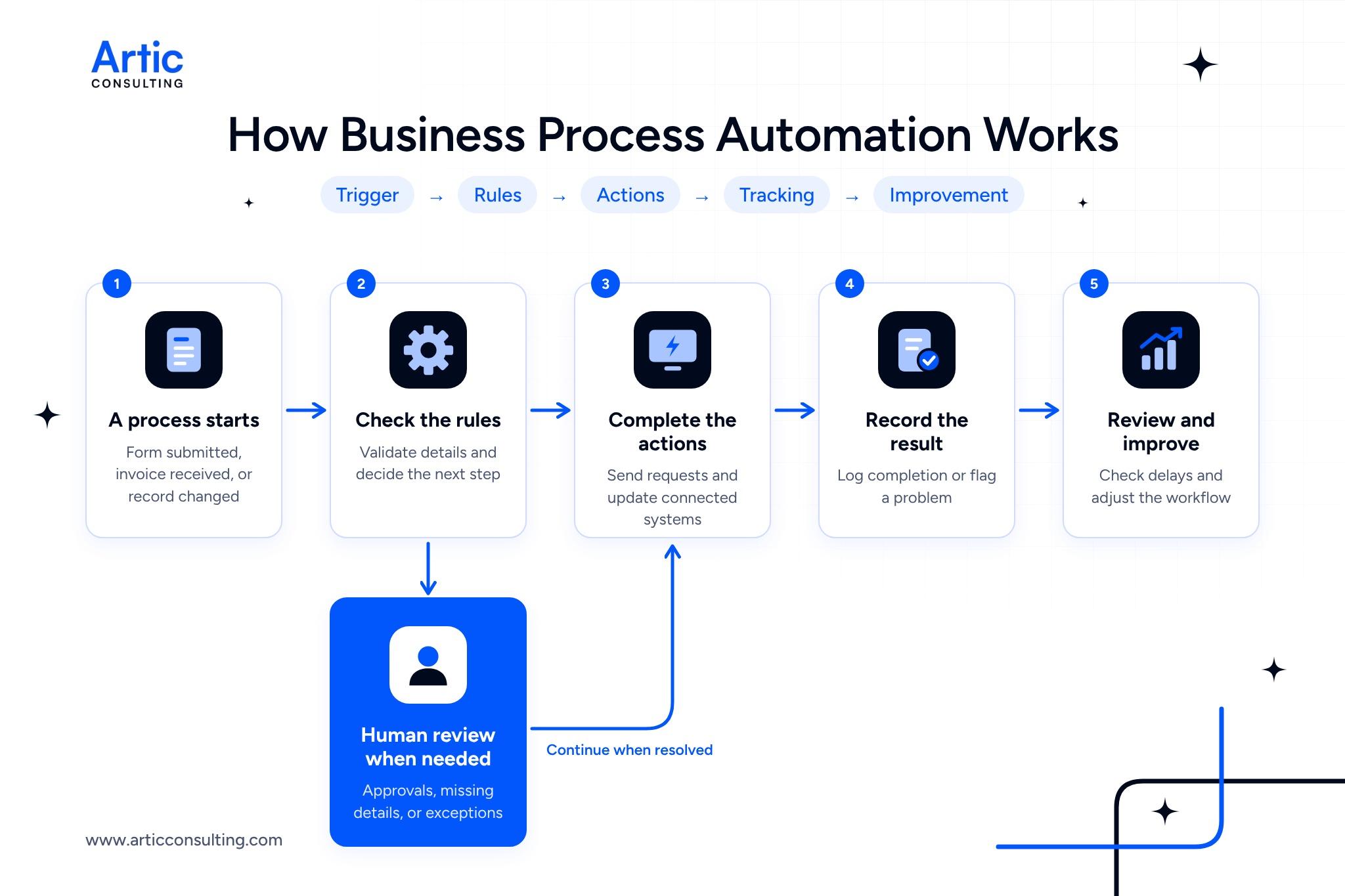
The image above gives you a basic idea of how BPA works. Every automated process starts with something happening, like a form being submitted or an order coming in. The software checks the information, follows the rules already set by the business, and carries out the required activities.
Now, if something doesn’t go as planned, the system can flag it for someone to check. It also keeps a record of what happened, so businesses can go back and see where things got delayed or whether something needs to be changed.
What Are the Different Types of Business Process Automation?
Would you believe it if we said there’s more than one way to automate business processes? Yes, it’s true because a lot depends on what kind of work your company does, the systems it uses, and how much of that work your company wants to automate.
Here are some of the common types you’ll come across.
1. Workflow Automation
Take a purchase request example where it needs an approval from at least two or three people before an order can be placed. Normally, one employee has to keep a track of who has approved it and who hasn’t. But in this case, automation takes care of moving that request from one person to another. It basically sends reminders when an approval is in pending status.
2. Robotic Process Automation (RPA)
Ever had to copy the same information from one application into another? That’s the kind of work RPA is used for. Software bots can open applications, enter details, download files, or complete other repetitive computer tasks. Many businesses use RPA when they’re dealing with older systems that don’t have an easy way to share information.
3. Intelligent Process Automation
Now, some processes aren’t as straightforward. Say an insurance company receives hundreds of claims, and each one comes with different documents and information. Intelligent process automation uses AI along with other automation technologies to help sort through that information. It can pick out important details and identify claims that need someone to take a closer look.
4. Document Process Automation
Businesses have to deal with quite a bit of paperwork like invoices, contracts, application forms, employee records, etc.. And someone usually has to read through these documents and enter the details somewhere. Now, document process automation can extract that information from digital documents or scanned copies, depending on the software being used. The information can then be checked and added to the appropriate system.
5. AI-Powered Business Process Automation
This is where AI becomes part of the workflow itself. For example, a customer might send an email asking about a delayed delivery. Instead of someone reading every message and deciding where it should go, AI can help identify the issue and route it to the right team. In some cases, it may even prepare a response for an employee to review.
What Are the Benefits of Business Process Automation?
If you look closely at how work gets done in most companies, you’ll probably find quite a few things that could be automated. And it’s not always about saving money. Sometimes, it’s simply about making life easier for employees who already have enough on their plates.
Let’s look at some of the benefits of business process automation and where they actually make a difference.
1. Less Time Spent on Manual Work
How much time does your team spend doing things that don’t really need much thinking? Say, entering the same customer details into two systems or preparing reports every Monday. These are small jobs, but they take up hours when you add them together. BPA can take care of such mundane tasks.
2. Fewer Human Errors
We’ve all made mistakes while working with spreadsheets or entering information into a system. Maybe a number gets typed incorrectly, or someone forgets to update a record. It happens, especially when people are handling large amounts of data. Automation reduces the chances of these mistakes by following the same instructions every time.
3. Faster Business Processes
Here’s something you might have noticed. Sometimes, a task that should take ten minutes ends up taking two days. Not because it’s difficult, but because it’s waiting for someone to respond or pass along some information. With automation, many of these small delays can be avoided.
4. Better Visibility Into Work
Let’s say a customer calls asking about the status of their request. Your employee checks their email, asks another department, and then waits for someone to get back to them. Not exactly the best experience for anyone involved. With BPA, the information can be available in one place, making it easier to see what’s happening and where things stand.
5. More Consistency Across Processes
Different people have different ways of doing things. That’s normal. But when it comes to important business processes, you probably don’t want everyone following their own method. Automation helps here by making sure the required steps are followed each time. Of course, the rules need to be set up correctly in the first place.
6. Easier to Handle Growing Workloads
Imagine your company starts getting twice as many orders as it did six months ago. That’s good news, right? But it also means more records to update, more requests to process, and more work for your existing team.
Now, if some of these activities are already automated, your employees don’t necessarily have to take on twice the manual work just because business has grown.
Real-World Business Process Automation Examples Across Industries
Business process automation is already being used by companies across banking, insurance, manufacturing, and logistics. And some have seen quite a difference in how long their everyday processes take.
Let’s look at four companies that have used automation to deal with manual work, older systems, and processes that were taking longer than they should.
1. Finance and Banking
BNP Paribas Cardif Japan: The company automated parts of its mortgage insurance claims process, including data entry, calculations, and approvals. Employees working on claims now save around two hours every day. The company also moved 15 employees to other departments, as much of their earlier manual work was no longer needed.
AgFirst Farm Credit Bank: AgFirst was looking to replace its older loan processing system and make it easier to manage changes in banking regulations. After introducing process automation, the bank was able to close loan cases 60% faster than expected, with 97% of loans being analyzed within the expected timeframe.
2. Logistics and Transportation
Ryder: A lot of Ryder’s vehicle rental work involved paperwork, emails, and even fax. The company introduced digital applications to handle vehicle inspections, rental documents, and customer signatures. This reduced rental transaction times by 50%, bringing them down to around 9–14 minutes. Ryder also reported a tenfold increase in customer satisfaction survey responses.
3. Manufacturing
Kyocera: Getting special pricing approved at Kyocera used to take around 10 days. The process involved spreadsheets, emails, and manual approvals. By introducing automation and connecting the process with SAP, the company brought the approval time down to 1.5 days. That’s an 85% reduction, along with roughly 20 minutes of employee time saved per approval.
These examples give us a fair idea of how businesses are using automation today. While the processes and technologies differ, the companies were dealing with problems that many other businesses would recognize, from paperwork and older applications to delays in getting everyday work completed.
What Business Processes Should You Automate First?
Not sure where to begin with automation? We’d suggest starting small. Look at the everyday work your employees handle and identify what’s taking up too much time.
|
Business Processes |
What to Look For |
|
Repetitive Tasks |
Work that's repeated daily, like updating records or preparing reports. |
|
Manual Data Entry |
Employees entering the same information into multiple systems. |
|
Delayed Approvals |
Requests getting stuck while waiting for approvals or responses. |
|
Error-Prone Tasks |
Frequent mistakes in data entry, calculations, or record updates. |
|
Difficult-to-Track Processes |
Employees struggling to find updates or check the status of requests. |
One thing we’d recommend: Don’t automate everything at once. Start with a simple process that happens regularly. And if the process itself has problems, fix those first before introducing automation.
Business Process Automation Tools and Technologies
There are quite a few business process automation tools available today. Some are meant for simple activities like sending reminders or updating records, while others can handle processes involving several applications, large amounts of data, and even AI.
But here’s something worth considering. You don’t necessarily need a new tool for every process. Your business might already have software that can do some of this work.
Below are some of the commonly used technologies.
1. Workflow Automation Tools
Tools like Microsoft Power Automate, Zapier, and Make can help businesses connect applications and automate everyday workflows. For instance, you could have a form submission automatically create a task, update a record, or send an email to the concerned team.
2. Robotic Process Automation (RPA) Tools
UiPath, Automation Anywhere, and Microsoft Power Automate Desktop are examples of RPA tools. They use software bots to carry out activities such as entering data, downloading reports, and working with applications that may not have built-in integrations.
3. Low-Code Automation Platforms
Microsoft Power Apps, Appian, and Mendix allow businesses to build applications with less traditional coding. If your team needs an internal application for managing requests or tracking work, these platforms can help create one without having to develop everything from scratch.
4. AI and Intelligent Automation Tools
Microsoft Copilot Studio and other AI automation platforms can help businesses handle work that involves understanding information, answering questions, or making decisions based on available data.
For example, an AI agent could help employees find information from company documents or collect details needed to start a business process.
5. System Integration Tools
Sometimes, the problem isn’t the lack of automation software. It’s that your existing applications don’t communicate with each other.
Tools such as Azure Logic Apps and other integration platforms can connect business systems and move information between them. This becomes particularly useful when a company works with a mix of older applications and newer cloud-based software.
How We Approach Business Automation at Artic
At Artic Consulting, we don’t start by recommending an automation tool. We first look at how your business works today, where employees are spending too much time, and what can realistically be automated.
A few things we usually look at:
- Existing systems: Can we work with the technology you already have?
- Manual work: Which activities are taking up unnecessary time?
- Integration: Do your applications need to share information?
- Long-term costs: What will it take to build, run, and maintain the automation?
- Security: What controls are needed to keep your business information safe?
Sometimes, a simple workflow is enough. Other times, you might need AI agents, system integration, or a custom application.
You can learn more about how we approach this through our Business Process Automation Consulting Services.
Common Business Process Automation Challenges
From the outside, business process automation may sound simple. You might have the right software, but that doesn’t necessarily mean everything will work the way you expected.
Here are a few problems businesses commonly run into.
- Older Systems: Your company might still be using software that’s been around for years. Getting it to work with newer automation tools isn’t always easy.
- Unclear Processes: Say, five employees are doing the same job in five different ways. Before automating anything, you’d probably need to agree on how that work should be done.
- Employee Resistance: Some employees may not be comfortable with automation, especially if they’re used to doing things a certain way.
- Poor Data Quality: If the information going into your system is wrong or incomplete, automation isn’t going to magically correct it.
- Security Concerns: When information moves between different applications, you need to make sure the right people have access to it.
- Implementation Costs: There’s the software, of course. But you also need to consider the cost of setting everything up, connecting systems, and maintaining it later.
And one thing worth remembering: automating a poorly managed process won’t necessarily make it better. Sometimes, you need to fix the process before bringing automation into the picture.
What’s Next for Business Process Automation in 2027?
If you ask us, 2027 is going to be an interesting year for business process automation. Not because we’ll have hundreds of new automation tools, but because businesses are beginning to rethink how much work actually needs to be done manually.
And we think AI will have quite a bit to do with that.
1. AI Agents Will Handle More of the Actual Work
We’ve talked enough about what AI can do. Now, businesses want to know what it can actually get done.
According to Microsoft’s 2025 Work Trend Index, 81% of surveyed leaders expected AI agents to become part of their company’s AI strategy within the following 12–18 months.
We believe more businesses will start using AI agents to manage routine activities, check information, and move work forward. But honestly, not every process needs an AI agent. Sometimes, a simple automated workflow is more than enough.
2. Businesses Will Make Better Use of Existing Technology
Here’s something we strongly believe. Companies don’t always need to buy new software to automate their work.
Many already have Microsoft 365, CRM systems, and other applications that can do much more than they’re currently being used for.
Take Microsoft Power Automate, for example. It can connect applications, automate workflows, and work with existing business systems.
So, why replace something when you could probably make better use of what you already have?
3. People Will Still Have an Important Role
There’s a lot of talk about AI taking over entire business processes. But we’re not convinced everything should run without human involvement.
Think about financial approvals, insurance claims, or decisions involving sensitive customer information.
Even the NIST AI Risk Management Framework emphasizes the importance of managing AI risks and maintaining proper governance.
We believe businesses will increasingly use AI to handle routine work while keeping employees involved in decisions that need human judgment.
4. Results Will Matter More Than the Technology
This is probably the biggest change we’d like to see in 2027.
According to McKinsey’s 2025 State of AI report, 88% of respondents reported regular AI use in at least one business function, but only 39% reported an enterprise-level EBIT impact.
That’s quite a gap.
And it raises a simple question. What’s the point of automating ten different processes if your employees are still dealing with the same delays and problems?
At Artic, we believe business process automation should start with the business problem, not the technology.
Because having the latest tools means very little if they aren’t making everyday work any easier.
Getting Started With Business Process Automation
If you’re thinking about introducing automation into your business, our advice would be to not rush into buying new software. Take a step back and look at how your team gets things done today.
Maybe there’s a process that’s taking longer than it should. Or your employees are spending hours on work that could easily be automated. Start there.
You don’t have to automate everything at once, either. Pick one process, understand what’s slowing it down, and see what can be improved using the technology you already have.
At Artic Consulting, that’s how we approach automation too. As a business and tech consulting firm, we first understand the process, the people involved, and the systems being used. From there, we help businesses decide whether they need a simple workflow, AI agents, or something more customized.
If you’re unsure where to begin, take a look at our Business Process Automation Consulting Services and see how we can help.
Still spending too much time on manual work?
Let’s find out what your business can automate and where to start.
Frequently Asked Questions
1. How much does business process automation cost?
It depends on what you’re automating. Simple workflows may cost very little, especially if you already have the software. More complicated processes involving multiple systems, custom development, and maintenance will naturally cost more.
2. How long does it take to implement business process automation?
A simple workflow might take a few days, while larger projects could take weeks or months. It really depends on the process, the systems involved, and how much testing is needed.
3. Is business process automation suitable for small businesses?
Of course. Even a small business can automate appointment scheduling, payment reminders, or customer follow-ups. You don’t necessarily need a big budget or an IT team to get started.
4. Do you need coding skills to use business process automation software?
Not always. Many BPA tools offer drag-and-drop features and ready-made templates. But if you’re building custom workflows or connecting older systems, you might need some technical help.
5. Is business process automation the same as business process management?
Not exactly. Business Process Management (BPM) focuses on managing and improving how work gets done. BPA uses technology to automate that work. And yes, you can improve a process without necessarily automating it.
6. How can you calculate the ROI of business process automation?
Start by comparing how much time and money a process takes before and after automation. Then subtract your software, implementation, and maintenance costs to see whether the investment is paying off.
7. Can business process automation work with older software?
Yes, in many cases. Older applications can sometimes be connected using APIs, RPA tools, or custom integrations. You may not have to replace the software you’re already using.
8. What happens when an automated workflow stops working?
That depends on how it’s built. The system might retry the task, send an alert, or stop until someone checks the problem. Having a backup plan is always a good idea.
9. Does business process automation help with regulatory compliance?
It can help maintain records, track approvals, and make audits easier. But automation alone doesn’t guarantee compliance. Your workflows still need to follow the regulations that apply to your business.
10. Who should manage business process automation in a company?
Ideally, both IT and the department using the process. The business team knows what needs to happen, while IT can handle the technical side. You’ll need both to make it work properly.
Table of contents
- Overview
- What is Business Process Automation and How Does it Work?
- What Are the Different Types of Business Process Automation?
1. Workflow Automation
2. Robotic Process Automation (RPA)
3. Intelligent Process Automation
4. Document Process Automation
5. AI-Powered Business Process Automation
- What Are the Benefits of Business Process Automation?
- Real-World Business Process Automation Examples
- What Business Processes Should You Automate First?
- Business Process Automation Tools and Technologies
1. Workflow Automation Tools
2. Robotic Process Automation (RPA) Tools
3. Low-Code Automation Platforms
4. AI and Intelligent Automation Tools
5. System Integration Tools
Get started
Ready to level-up your business?

Amit Giri has 14 years of experience helping organizations navigate technology decisions and align solutions with business goals. His interests include artificial intelligence, Microsoft technologies, cloud solutions, data analytics, digital transformation, and process improvement. Through Artic Insights, Amit shares practical perspectives on using technology to solve real-world business challenges and create lasting value.