“How much does it cost?” sounds like a simple question.
With Microsoft products, the answer is often more complicated than expected.
Two tools that appear similar can have completely different licensing models. One may charge per user. Another may charge based on usage. AI tools can introduce additional costs that weren’t part of traditional software licensing.
The license price is only one piece of the puzzle. User count, storage, AI features, automation, and usage patterns can all have an impact on what you end up spending.
Understanding Microsoft Licensing Models Before You Start
Things start to get interesting once licensing enters the discussion. What works for one Microsoft product may not apply to another.
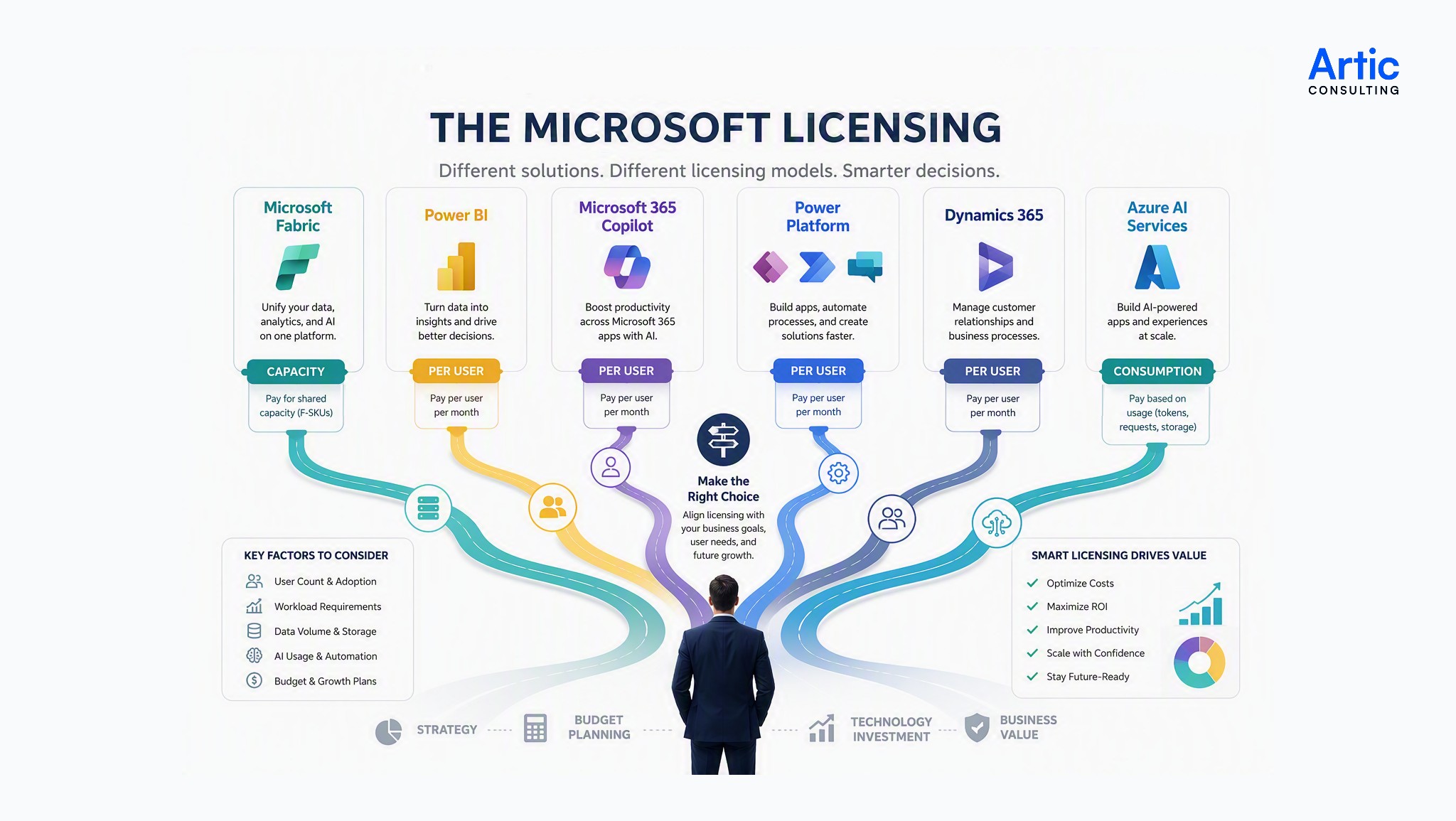
You might look at Microsoft Copilot and get a clear price per user. Then you look at Fabric and realize you’re paying for capacity. Next, you check Azure and discover the cost depends on how much you use.
Same company. Same Microsoft ecosystem. Completely different pricing models.
That’s usually where the confusion starts.
Per-User Licensing
This is the pricing model most people are familiar with.
Need a license for 20 employees? Buy 20 licenses.
Need licenses for another 10 employees next month? Buy 10 more.
The cost is usually easy to estimate because it grows as your user count grows. Products like Microsoft Copilot and many Dynamics 365 applications often follow this approach.
Capacity Licensing
This model feels a little different. Instead of paying for each individual user, you’re paying for a shared pool of resources.
Think of it like reserving space in a parking lot rather than paying for each car separately. Everyone uses the same pool, and the amount you need depends on how busy things get.
Microsoft Fabric is a good example of this approach.
Usage-Based Licensing
This is the model that catches people off guard.
The bill depends on what you actually use.
Some months may be higher. Some may be lower. More data, more processing, more AI usage, or more activity can all affect the final cost.
Many Azure services fall into this category.
Before comparing licensing costs across Microsoft products, it’s worth understanding which of these models you’re dealing with. Once you know what is driving the price, the numbers become much easier to understand.
Why Microsoft Licensing Feels More Complicated Today
Not long ago, estimating software costs was usually straightforward. Today, a single Microsoft solution may involve user licenses, capacity, storage, AI features, and usage-based charges. The result is that cost estimates often require a closer look than they did a few years ago.
Microsoft Licensing Cost Comparison at a Glance
Note* All pricing figures are subject to change and may vary by region, agreement type, and Microsoft licensing updates.
1. Microsoft Fabric Licensing Costs
Most Microsoft products are licensed per user. Fabric works differently. You’re not primarily paying for individual users. Instead, you’re paying for capacity, which is a pool of computing resources shared across reporting, data engineering, data warehousing, real-time analytics, AI workloads, and other Fabric experiences.
That sounds simple enough until someone asks:
“How much capacity do we actually need?”
That’s where most budgeting discussions begin.
How Does Microsoft Fabric Licensing Work?
Microsoft Fabric uses F-SKUs (Fabric Capacities). Each capacity provides a certain number of Capacity Units (CUs), which are used to run workloads across the platform. Microsoft’s published examples show capacities starting with F2 and scaling upward depending on workload requirements.
For organizations just getting started, F2 is often the first capacity tier they encounter.
|
Fabric Capacity |
Approximate Monthly Cost* |
|
F2 |
~$262.80/month |
|
F4 |
~$525.60/month |
|
F8 |
~$1,051.20/month |
*Based on Microsoft’s published pay-as-you-go examples. Actual pricing varies by region and purchasing model.
What Impacts Fabric Costs?
The cost of Fabric is rarely determined by a single dashboard or report.
A small reporting project may require very little capacity. Costs can increase as organizations begin using additional Fabric workloads such as:
- Data Warehousing
- Data Engineering
- Real-Time Analytics
- Data Science
- AI and Copilot experiences
- Larger data volumes
- More concurrent users
Because these workloads share the same capacity, usage in one area can affect overall demand.
Explore More Details: Microsoft Fabric Pricing
2. Power BI Pro Licensing Costs
Power BI licensing doesn’t get much attention in the early stages of a project. Most teams focus on building dashboards and reports first. Questions about licensing tend to come later, when employees start asking how they can view, share, or collaborate on that content. That’s where Power BI Pro becomes relevant.
What Does Power BI Pro Cost?
Power BI Pro is currently priced at $14 per user per month.
That means a team of:
|
Users |
Estimated Monthly Cost |
|
10 |
$140 |
|
25 |
$350 |
|
50 |
$700 |
|
100 |
$1,400 |
Based on Microsoft’s published Power BI Pro pricing.
What Do You Get With Power BI Pro?
For many organizations, Power BI Pro is enough to get started.
A Pro license allows users to:
- Publish reports to the Power BI Service
- Share dashboards and reports
- Collaborate with other users
- Schedule data refreshes
- Access reports shared by other licensed users
For small and mid-sized teams, those capabilities often cover most reporting needs.
3. Microsoft 365 Copilot Licensing Costs
Most Microsoft tools are designed to solve a specific business problem. Power BI focuses on reporting. Fabric focuses on analytics and data. Dynamics 365 focuses on business applications.
Microsoft 365 Copilot is a little different.
Instead of introducing a new application, it brings AI into tools many employees already use every day, including Outlook, Teams, Word, PowerPoint, and Excel.
That’s one reason it quickly became part of technology and budgeting discussions.
What Does Microsoft 365 Copilot Cost?
Microsoft 365 Copilot is licensed at $30 per user per month and requires an eligible Microsoft 365 subscription.
Here’s how that can look at different team sizes:
|
Users |
Estimated Monthly Cost |
|
10 |
$300 |
|
25 |
$750 |
|
50 |
$1,500 |
|
100 |
$3,000 |
Figures shown exclude the cost of the underlying Microsoft 365 license.
What is Included With a Copilot License?
A Copilot license gives users access to AI-powered assistance across Microsoft 365 applications.
Common use cases include:
- Drafting emails
- Summarizing meetings
- Creating presentations
- Generating document content
- Analyzing data
- Finding information across emails, files, chats, and calendars
Because Copilot works within familiar applications, employees can often start using it without learning an entirely new platform.
What Usually Impacts the Overall Cost?
The license price is straightforward.
The bigger question is usually how many employees should receive a license.
Some employees spend hours each day writing content, preparing presentations, searching for information, and attending meetings. Others may only perform those activities occasionally.
That’s why many organizations start with a smaller group of users before expanding access more broadly.
Know More About Microsoft 365 Copilot
6. Microsoft Copilot Studio Licensing Costs
Microsoft 365 Copilot helps employees work inside tools like Outlook, Teams, Word, and PowerPoint.
Copilot Studio serves a different purpose. It’s designed for organizations that want to build their own AI agents. These agents can answer questions, retrieve information, automate tasks, and connect to business systems across the organization.
That’s why Copilot Studio often becomes part of the conversation when companies move beyond individual productivity and start looking at broader business automation.
What Does Copilot Studio Cost?
Copilot Studio does not follow the same straightforward per-user pricing model as Microsoft 365 Copilot.
Instead, pricing is tied to agent usage and consumption. The more conversations, interactions, and AI requests your agents handle, the more important usage planning becomes.
This makes budgeting a little different from products where the cost is based solely on the number of licensed users.
Option 1: Copilot Studio Pre-Purchase Plan
- $200/month
- Includes 25,000 Copilot Credits
- Suitable for organizations that want predictable monthly costs.
Option 2: Pay-As-You-Go
- $0.01 per Copilot Credit
- Billed through an Azure subscription
- Ideal when usage varies from month to month.
Microsoft 365 Copilot + Copilot Studio
- Microsoft 365 Copilot: $30/user/month (annual commitment)
- Allows creation and use of agents within the Microsoft 365 Copilot ecosystem.
What Can You Build With Copilot Studio?
Organizations commonly use Copilot Studio to create:
- Employee support agents
- HR self-service assistants
- IT help desk agents
- Customer service chatbots
- Knowledge search assistants
- Process automation agents
The same platform can support a small internal project or a large customer-facing solution.
What Usually Impacts Cost?
The biggest factor is often usage.
An agent answering a few employee questions each day will have very different costs than one supporting hundreds or thousands of conversations every month.
Other factors can include:
- Number of AI agents
- Conversation volume
- Connected data sources
- Business system integrations
- Generative AI usage
Know more details about Microsoft Copilot Studio Licensing
7. Dynamics 365 Sales Enterprise Licensing Costs
Most CRM projects start with a simple goal: give sales teams a better way to manage leads, opportunities, and customer relationships.
The challenge is that CRM usage rarely stays small for long.
A sales team may start with a handful of users. Then managers want forecasting. Leadership wants dashboards. Marketing needs customer insights. Before long, more users and additional functionality enter the conversation.
That’s when licensing becomes a bigger topic.
What Does Dynamics 365 Sales Enterprise Cost?
Dynamics 365 Sales Enterprise is currently priced at approximately $105 per user per month under Microsoft’s standard licensing model.
|
Users |
Estimated Monthly Cost |
|
10 |
$1,050 |
|
25 |
$2,625 |
|
50 |
$5,250 |
|
100 |
$10,500 |
For many organizations, Dynamics 365 Sales is one of the larger per-user investments in the Microsoft ecosystem.
What is Included?
Dynamics 365 Sales Enterprise is designed to help sales teams manage the entire sales process from lead generation through opportunity management and customer engagement.
Organizations typically use it to:
- Track leads and opportunities
- Manage customer relationships
- Improve sales forecasting
- Monitor pipeline performance
- Standardize sales processes
- Gain visibility into revenue activities
As organizations mature their sales operations, these capabilities often become part of daily workflows.
What Usually Drives the Cost?
Unlike Azure or Fabric, Dynamics 365 Sales costs are primarily driven by user counts.
The more employees who need direct access to the platform, the higher the licensing cost.
However, organizations often discover that not every employee needs the same level of access. Many deployments focus first on sales representatives, account managers, sales leaders, and customer-facing teams before expanding further.
Know more details about Dynamics 365 Sales Pricing
8. Azure AI Services and Azure OpenAI Licensing Costs
Most Microsoft products have a fixed monthly price. Azure AI doesn’t work that way.
You don’t start by deciding how many users need a license. Instead, the conversation usually starts with a use case.
Maybe it’s a chatbot. Maybe it’s document processing. Maybe it’s an AI assistant for employees. The cost depends on what you’re building and how often it’s used.
That’s why two organizations using the same AI model can end up with very different monthly bills.
How Does Azure AI Pricing Work?
Azure AI Services and Azure OpenAI use a pay-as-you-go model.
Instead of paying per user, organizations are billed based on consumption. The exact pricing depends on the service, model, and volume of usage. Azure OpenAI pricing, for example, is tied to model usage and token consumption rather than named users.
For many teams, this is a different way of thinking about software costs.
You are not paying for access. You’re paying for activity.
What Usually Impacts Cost?
Several factors can influence what an organization spends on Azure AI.
- AI model selection
- Number of requests
- Token consumption
- Documents processed
- Images generated
- Data storage
- Application usage
A small internal AI assistant used by 20 employees will look very different from a customer-facing chatbot handling thousands of conversations each day.
Why Can Costs Change From Month to Month?
Adoption. An AI solution might launch with a small pilot group and generate modest usage. If employees start using it regularly or customers begin interacting with it at scale, consumption can increase quickly.
Unlike per-user licenses, AI costs don’t always grow in predictable steps. The platform may be doing more work even when the number of users stays the same.
Explore pricing options of Azure OpenAI Pricing
Discover Azure AI pricing by product
How to Build a Cost-Effective Microsoft Licensing Strategy
There isn’t a perfect Microsoft licensing strategy that works for every organization. The companies that get the most value from Microsoft technology are usually the ones that take the time to understand what they’re buying, who needs it, and how it will be used.
A few simple practices can help keep costs under control while avoiding unnecessary licensing spend.
1. Start With Business Requirements
It’s tempting to start with features and pricing. A better approach is to start with the problem you’re trying to solve.
Are you looking to improve reporting? Automate manual work? Introduce AI into daily workflows? Build business applications? The answers will often narrow down the list of products and licenses you actually need. Buying technology before defining the business requirement often leads to unnecessary costs later.
2. Buy for Current Usage, Not Future Assumptions
Many organizations purchase licenses based on what they expect to need a year from now. Growth is important, but licensing for users, workloads, or projects that don’t exist yet can leave money sitting unused. Start with current requirements, monitor adoption, and expand as demand grows.
3. Review License Usage Regularly
Licensing decisions shouldn’t be made once and forgotten. Employees change roles. Projects end. New technologies are introduced. What made sense six months ago may no longer be necessary today. A periodic review can help identify unused licenses, underutilized services, and opportunities to reassign resources before renewal time.
4. Monitor Adoption and Value
A purchased license only creates value when people actually use it. This is especially true for products like Microsoft 365 Copilot, Power Platform, and Dynamics 365. Tracking adoption helps organizations understand which investments are delivering results and which may require additional training, governance, or support.
5. Plan for Scale Before it Happens
Successful projects tend to grow. A Power App built for one department may eventually be used across the organization. A Copilot pilot may expand from a small team to hundreds of users. An Azure AI solution may process far more requests than originally anticipated. Thinking about growth early can help avoid unexpected licensing and infrastructure costs later.
Work With a Microsoft Partner When Licensing Gets Complex
Microsoft licensing has become more flexible, but it has also become more layered. A reporting project might involve Power BI and Fabric. An AI initiative could include Microsoft 365 Copilot, Copilot Studio, and Azure OpenAI. As solutions grow, it becomes harder to understand what licenses are required today and what costs could look like six months from now.
At Artic Consulting, we’ve seen organizations spend more time trying to navigate licensing options than evaluating the technology itself. The goal isn’t to buy the lowest-cost license or the most expensive one. It’s to align licensing with actual business needs, expected usage, and long-term growth plans.
A little planning upfront can prevent costly surprises later and help ensure you’re investing in the Microsoft tools that deliver the most value.
Align Microsoft Licensing with Business Value
Licensing should support your business goals, not create unnecessary complexity. Artic Consulting helps organizations navigate Microsoft licensing, optimize costs, and plan for future growth across AI, analytics, automation, and business applications.
FAQs
1. Which Microsoft product is the most expensive?
There isn’t a single answer because Microsoft products use different licensing models. User-based products such as Microsoft 365 Copilot and Dynamics 365 have predictable monthly costs, while platforms like Microsoft Fabric and Azure AI can vary based on capacity and usage.
2. How is Microsoft Fabric licensed?
Microsoft Fabric uses a capacity-based licensing model. Instead of purchasing licenses for individual users, organizations purchase Fabric capacity that is shared across reporting, analytics, data engineering, AI, and other workloads.
3. Do all Power BI users need a Power BI Pro license?
Not always. Licensing requirements depend on how reports are created, published, and shared. Many organizations use Power BI Pro for report authors and frequent users, while broader sharing scenarios may require additional licensing considerations.
4. Is Microsoft 365 Copilot included with Microsoft 365?
No. Microsoft 365 Copilot is typically purchased as an add-on license and requires an eligible Microsoft 365 subscription before it can be assigned to users.
5. What is the difference between Microsoft 365 Copilot and Copilot Studio?
Microsoft 365 Copilot helps employees work within Microsoft applications such as Outlook, Teams, Word, and PowerPoint. Copilot Studio is used to build custom AI agents that can connect to business systems, automate tasks, and answer questions using company data.
6. What drives Azure AI and Azure OpenAI costs?
Azure AI and Azure OpenAI use a consumption-based pricing model. Costs are influenced by factors such as model selection, token usage, requests, document processing volume, and overall application usage.
7. Can Microsoft licensing costs increase over time?
Yes. Costs often grow as more users are added, adoption increases, additional features are enabled, or new workloads are introduced. This is especially common with AI, analytics, and cloud-based services.
8. How often should organizations review Microsoft licenses?
A licensing review at least once or twice a year can help identify unused licenses, underutilized services, and opportunities to optimize costs before renewal periods.
9. Should organizations buy licenses for future growth?
Most organizations are better off licensing for current requirements and expanding as adoption grows. Purchasing large numbers of unused licenses can increase costs without delivering immediate value.
10. How can organizations reduce Microsoft licensing costs?
The most effective approach is to align licenses with actual business needs, monitor usage regularly, remove unused subscriptions, and review licensing decisions as technology requirements evolve. Working with an experienced Microsoft partner can also help uncover optimization opportunities.
Table of contents
- Overview
- Understanding Microsoft Licensing Models
- Microsoft Licensing Cost Comparison at a Glance
- Microsoft Fabric Licensing Costs
- Power BI Pro Licensing Costs
- Microsoft 365 Copilot Licensing Costs
- Power Apps Premium Licensing Costs
- Power Automate Premium Licensing Costs
- Microsoft Copilot Studio Licensing Costs
- Dynamics 365 Sales Enterprise Licensing Costs
- Azure AI Services and Azure OpenAI Licensing Costs
- Build a Cost-Effective Microsoft Licensing Strategy
- How Microsoft Partner Helps
- FAQs
Get started
Ready to level-up your business?

Amit Giri has 14 years of experience helping organizations navigate technology decisions and align solutions with business goals. His interests include artificial intelligence, Microsoft technologies, cloud solutions, data analytics, digital transformation, and process improvement. Through Artic Insights, Amit shares practical perspectives on using technology to solve real-world business challenges and create lasting value.