A grant application is submitted. A few months later, reporting deadlines start approaching. Program updates need to be collected, supporting documents need to be reviewed, and someone has to make sure everything is ready before submission.
Similar work happens across volunteer programs, fundraising activities, and service delivery initiatives. The tasks themselves may not be complicated, but keeping everything moving often requires a considerable amount of coordination.
This is one reason nonprofit organizations are beginning to look at Microsoft Copilot AI Agents. Rather than helping with a single task, they can support recurring processes that involve multiple people, systems, and steps.
In the sections below, we’ll look at practical ways nonprofit organizations can use Microsoft Copilot AI Agents across different parts of their operations.
Understanding Microsoft Copilot AI Agents
Let’s use grant reporting as an example to understand what Microsoft Copilot AI agents are exactly and how they work.
A program manager submits updates. Supporting documents are collected. Someone reviews the information. Questions are sent back if something is missing. Deadlines are checked. Reminders are sent when required.
Most nonprofits already have processes like this in place.
Think about a process that happens every month. Updates need to be collected, somebody needs to check what is missing, reminders need to go out, and information has to be prepared before it can be reviewed.
Microsoft Copilot for nonprofits can help with these types of activities. Instead of starting from scratch each time, an AI agent works within the process and helps keep things moving.
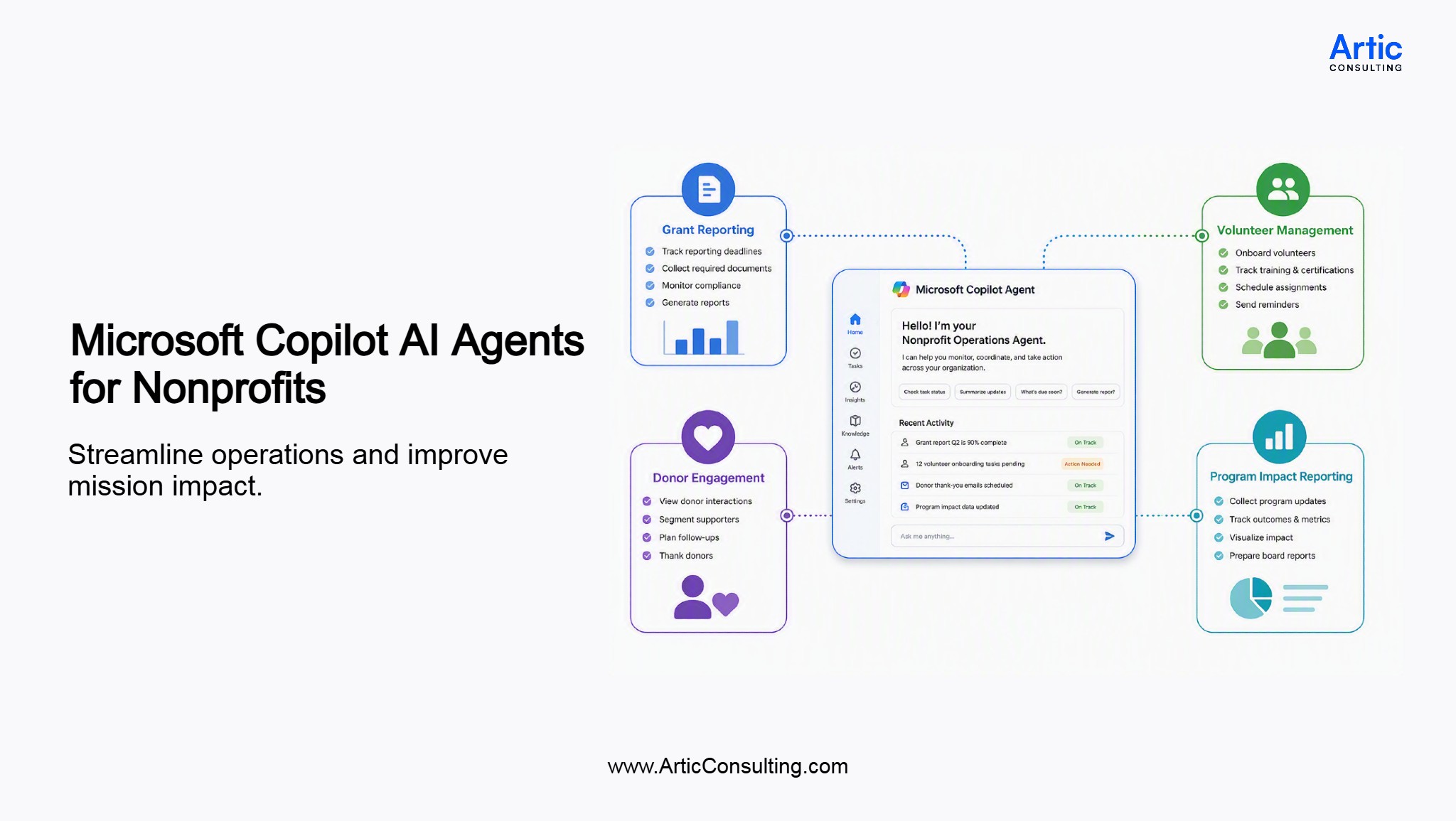
This can be useful across grant reporting, volunteer management, donor engagement, and other activities that involve regular follow-up.
Why Nonprofits Are Exploring AI Agents
Some nonprofit activities never really stop. For instance, a grant report is being prepared, new volunteers are coming through onboarding, donor follow-ups are scheduled, and program teams are sharing updates. At the same time, deadlines need attention and information needs to be collected from different people.
Keeping track of all of this can take more effort than people expect.
The work itself is usually manageable. What often takes time is following up, checking status updates, gathering information, and making sure nothing gets overlooked. As programs grow, these activities tend to increase as well.
This is one reason AI Agents are getting attention from nonprofit organizations. They can help support processes that involve regular coordination, multiple stakeholders, and ongoing follow-up, allowing teams to spend less time managing the process and more time focusing on the work itself.
4 Practical Uses of Microsoft Copilot AI Agents for Nonprofits
1. Grant Management and Reporting
For many organizations, grant management for nonprofits involves much more than submitting an application. Reporting deadlines, compliance requirements, and progress updates all need ongoing attention throughout the funding period.
None of this is unusual. It’s simply how grant management works.
The challenge is that these activities happen repeatedly throughout the grant lifecycle. The same requests, reminders, and status checks often take place every reporting period.
This is where AI Agents can be useful. An Agent can help keep track of nonprofit grant reporting requirements, identify missing updates, surface documents that may be needed, and notify the appropriate people when action is required.
Rather than spending time figuring out what is still outstanding, teams can focus on reviewing information and preparing submissions.
2. Volunteer Management
Volunteer management programs often run on a series of small but important actions.
Applications are submitted. Training materials are shared. Background checks may need to be completed. Volunteers receive reminders before upcoming activities. Coordinators check whether requirements have been met before assigning responsibilities.
When volunteer numbers are relatively small, these activities are usually easy to manage.
As programs expand, however, keeping track of everything can become more difficult. Information is spread across emails, spreadsheets, forms, and conversations. Missing one step can create extra work later.
Steel Hearts, a small nonprofit featured by TechSoup, has used Microsoft 365 Copilot to find important information in Outlook, including member contact details that would otherwise take time to search manually.
AI Agents can help support these processes by monitoring activities that are already taking place. For example, they may help identify volunteers who have not completed training, notify coordinators when action is required, or provide updates on onboarding progress.
The process stays the same. There is simply less manual follow-up involved.
3. Donor Engagement and Fundraising
A fundraiser is getting ready for a donor meeting. Before the meeting starts, there’s usually some preparation involved. Someone checks previous donations, looks at past event attendance, reviews meeting notes, and tries to piece together a complete picture of the relationship.
None of this work is particularly difficult. The challenge is that the information often sits in multiple places.
An AI Agent could help by bringing that information together before the meeting takes place. Instead of opening several systems or digging through old emails, the fundraiser starts with a summary of recent interactions, giving history, and any outstanding follow-up items.
Qatar Charity is a useful example. The nonprofit used a Copilot Studio-based solution with Microsoft Azure and Dynamics 365 to improve call center operations and automate thousands of monthly donor reminder calls.
The conversation is still led by people. The preparation simply takes less effort.
Another example is donor follow-up. A thank-you message may have been sent, but the next step isn’t always obvious. An AI Agent can help identify donors who haven’t been contacted recently, highlight supporters who have become more engaged, or remind teams about activities that were planned but never completed.
4. Program and Service Delivery
Many nonprofits rely on information from several people before they can tell a complete story about a program.
A program manager may have one update. Another team may have attendance data. Someone else may be responsible for outcomes, surveys, or feedback from participants.
If a board meeting is scheduled for next week, gathering all that information often becomes a last-minute exercise.
This is one area where AI Agents can help.
Instead of waiting until updates are needed, information can be collected and organized as activities take place. When it’s time to prepare an internal review, a board update, or a funder report, teams spend less time searching for information and more time discussing what the information means.
A real example comes from Children International, where staff used Microsoft Copilot Studio to create an agent that helps field teams find answers from training materials and documentation more quickly.
For organizations running multiple programs at the same time, that visibility can be just as valuable as the automation itself.
How to Build a Custom AI Agent with Microsoft Copilot Studio
Organizations that need more specialized solutions can use Copilot Studio for nonprofits to build custom AI Agents around existing processes and workflows.
1. Start with the Process, Not the Technology
Before opening Copilot Studio, it helps to identify a process that takes time, requires repeated follow-up, or depends on information from multiple people.
For example, grant reporting often involves collecting updates from program teams, reviewing supporting documentation, validating information, and preparing reports before submission. Volunteer onboarding and donor follow-up processes may involve similar coordination.
The clearer the process, the easier it becomes to determine where an AI Agent can help.
2. Identify the Information the Agent Needs
AI Agents work best when they can access the information required to support a process.
Depending on the use case, this could include:
- Grant documentation
- Volunteer records
- Donor information
- Program updates
- Policies and procedures
- Files stored in SharePoint
- Information shared through Microsoft Teams
Taking time to organize information sources often makes a bigger difference than the Agent itself.
3. Define What the Agent Should Do
The next step is deciding where the Agent fits into the process.
For example, an Agent could:
- Track reporting deadlines
- Send reminders
- Identify missing information
- Answer commonly asked questions
- Gather updates from different teams
- Prepare information for review
The goal is usually not to automate an entire process on day one. Most organizations start with one or two specific responsibilities and expand from there.
4. Build and Test the Agent in Copilot Studio
Copilot Studio provides tools for creating and configuring AI Agents without extensive custom development.
Organizations can define the Agent’s purpose, connect information sources, establish instructions, and test how the Agent responds to different scenarios.
This testing phase is important because it helps ensure the Agent provides useful responses and supports the process as intended.
5. Start Small and Refine Over Time
One of the most practical approaches is to begin with a single use case.
A nonprofit might start with grant reporting, volunteer onboarding, or donor follow-up before exploring additional opportunities.
As teams become more comfortable with the technology, AI Agents can be expanded to support more complex workflows and operational processes.
Conclusion
Most nonprofits already know where a lot of time goes. Mostly, preparing reports, following up on missing information, coordinating volunteers, reviewing donor activity, and keeping track of deadlines.
These are routine parts of running an organization, but they can take time away from other priorities.
Microsoft Copilot AI Agents give nonprofits another way to manage this work. The technology itself is only part of the story. The bigger opportunity is finding processes that require constant coordination and making them easier to manage.
That’s often where the value begins.
Looking at Microsoft Copilot AI Agents for Your Nonprofit?
Understanding the technology is one thing. Figuring out where it makes sense in your organization is another. Artic can help you evaluate opportunities and build a plan around your existing processes.
FAQs
1. Can Microsoft Copilot AI Agents work alongside existing nonprofit systems?
They can. Many nonprofits continue using their existing grant management, donor management, and volunteer management processes while introducing Microsoft Copilot AI Agents to support specific activities within those workflows.
2. How are nonprofits using Microsoft Copilot AI Agents today?
The use cases vary quite a bit. Some teams use them for grant reporting. Others use them for volunteer onboarding, donor follow-up, or collecting program updates before a board meeting. It usually starts with a process that already involves a lot of follow-up.
3. Can Microsoft Copilot AI Agents help with grant management for nonprofits?
They can help with some of the work around grant management. For example, keeping track of reporting deadlines, collecting updates from staff, or identifying information that is still missing before a report is submitted.
4. Are AI Agents for nonprofits only useful for large organizations?
Not necessarily. A small nonprofit can spend just as much time following up on information as a larger one. In many cases, the challenge is not the size of the organization but the amount of coordination involved.
5. Our grant reports are already getting submitted. Why would we change anything?
You may not need to change much at all. Some organizations use Microsoft Copilot AI Agents to support the work that happens before the report is written. That might be collecting updates, tracking deadlines, or identifying information that still needs attention.
6. We keep donor information in several places. Does that matter?
It can. A fundraiser might look at donation history in one system, event attendance in another, and meeting notes somewhere else. This is one reason some nonprofits look at AI Agents. They want less time spent searching and more time spent preparing for conversations.
7. We onboard volunteers only a few times a year. Is that enough to justify an AI Agent?
That depends on the amount of follow-up involved. If coordinators are regularly chasing documents, training records, or status updates, there may be opportunities to simplify parts of the process.
8. Our biggest challenge isn’t fundraising. It’s reporting. Can AI Agents help there?
Reporting is actually one of the areas many nonprofits look at first. Program updates, financial information, supporting documents, and approvals often come from different people. Bringing all of that together can take time.
Get started
Ready to level-up your business?

Amit Giri has 14 years of experience helping organizations navigate technology decisions and align solutions with business goals. His interests include artificial intelligence, Microsoft technologies, cloud solutions, data analytics, digital transformation, and process improvement. Through Artic Insights, Amit shares practical perspectives on using technology to solve real-world business challenges and create lasting value.